Trimester 1 animations (2026)
This page will consist of all animations I will be doing with all of the processes and research for the spesfic lessons. They will be broken down with BIG headers saying what lesson they are so it is easy to navigate!!
┊ ✩ ┊ ✧ ┊ ┊
┊ ┊★ ┊ ✩⋆
┊ ┊ ⊹˚
✩⋆ ✮
.𖥔 ݁ ˖ ✦ ‧₊˚ ⋅
⠀⠀⠀⠀⠀⠀⠀⠀⠀⠀⠀⠀⠀⠀⠀⠀⠀⠀⠀⠀⠀⠀⠀⠀⠀⠀⠀⠀⠀⠀
⠀⠀⠀⠀⠀⠀⠀⠀⠀⠀⠀⠀⠀⠀⠀⠀⠀⠀⠀⠀⠀⣀⠀⠀⠀⠀⠀⠀⠀⠀
⠀⠀⠀⠀⠀⠀⠀⠀⠀⠀⠀⠀⠀⠀⠀⠀⠀⠀⠀⠀⠚⣿⠃⠀⠀⠀⠀⠀⠀⠀
⠀⠀⠀⠀⠀⠀⠀⠀⠀⠀⠀⠀⠀⠀⠀⠀⠀⢀⣀⡔⢐⣿⣧⢢⣀⡀⠀⠀⠀⠀
⠀⠀⠀⠀⠀⠀⠀⠀⡴⣶⠆⠀⠀⠀⠀⠀⣞⣯⢯⣅⣘⣿⣿⣿⣿⣿⣳⠀⠀⠀
⠀⠀⠀⠀⠀⠀⠀⠰⠆⣿⡤⠀⠀⠀⠀⠀⠈⠛⠳⣶⡄⠀⣶⡿⠟⠛⠁⠀⠀⠀
⠀⠀⠀⠀⠀⠀⢀⠀⡌⣿⣧⢁⠀⠀⠀⠀⠀⠀⠀⠘⣿⢸⡟⠀⠀⠀⠀⠀⠀⠀
⠀⠀⠀⠀⢀⣤⠟⠐⠀⢹⣿⣧⠳⣄⡀⠀⠀⠀⠀⠀⠈⠛⠀⠀⠀⠀⠀⠀⠀⠀
⠀⠀⠀⣾⣫⡵⣤⣀⡀⠈⠻⣿⣿⣿⣭⡆⠀⠀⠀⠀⠀⠀⠀⠀⠀⠀⠀⠀⠀⠀
⠀⠀⠀⠈⠛⢿⣶⣿⣿⣶⣾⣿⡿⠿⠋⠀⠀⠀⠀⠀⠀⠀⠀⠀⠀⠀⠀⠀⠀⠀
⠀⠀⠀⠀⠀⠀⠹⣿⣿⣿⣿⡟⠀⠀⠀⠀⠀⠀⠀⠀⠀⠀⠀⠀⠀⠀⠀⠀⠀⠀
⠀⠀⠀⠀⠀⠀⠀⢻⣿⢻⣿⠁⠀⠀⠀⠀⠀⠀⠀⠀⠀⠀⠀⠀⠀⠀⠀⠀⠀⠀
⠀⠀⠀⠀⠀⠀⠀⠘⢿⣼⠏⠀⠀⠀⠀⠀⠀⠀⠀⠀⠀⠀⠀⠀⠀⠀⠀⠀⠀⠀
⠀⠀⠀⠀⠀⠀⠀⠀⠀⠁⠀⠀⠀⠀⠀⠀⠀⠀⠀⠀⠀⠀⠀⠀⠀⠀⠀⠀⠀⠀
⠀⠀⠀⠀⠀⠀⠀⠀⠀⠀⠀⠀⠀⠀⠀⠀⠀⠀⠀⠀⠀⠀⠀⠀⠀⠀⠀⠀⠀⠀
.𖥔 ݁ ˖๋ ࣭ ⭑
⠀⠀⠀⠀⠀⠀⠀⠀⠀⠀⢠⣤⣤⡄⢠⣤⣤⡄⠀⠀⠀⠀⠀⠀⠀⠀
⠀⠀⠀⠀⠀⠀⠀⠀⠀⢸⡟⢦⡀⠛⣿⠁⠀⢹⣇⠀⠀⠀⠀⠀⠀⠀
⠀⠀⠀⠀⠀⠀⠀⠀⠀⠘⢻⡆⠓⡆⠛⣶⠀⠀⣿⠁⠀⠀⠀⠀⠀⠀
⠀⠀⠀⠀⠀⠀⠀⠀⠀⠀⠈⢹⡆⠓⡄⢹⡆⠀⠉⣷⠀⠀⠀⠀⠀⠀
⠀⠀⠀⠀⠀⠀⠀⠀⠀⠀⠀⠈⣿⡇⢹⠈⢹⡇⠀⡿⣤⠀⠀⠀⠀⠀
⠀⠀⠀⠀⠀⠀⢀⣀⣀⣀⣀⡀⠈⣿⣀⣹⠀⠙⠛⠃⠘⠛⢣⣄⠀⠀
⠀⠀⠀⠀⣰⠶⠞⠛⠛⠛⠛⠳⠶⣆⡿⠀⠀⠀⠀⢀⣀⣤⠀⠙⣷⠀
⠀⠀⣤⠾⠉⠀⠀⠀⠀⠀⠀⠀⠀⠉⠀⠀⠀⠀⠀⠸⠿⠿⠀⠀⣉⣷
⠀⢸⡏⠀⠀⠀⠀⠀⠀⠀⠀⠀⠀⠀⠀⠀⠀⠀⠀⠀⠀⠀⠀⠀⠉⣿
⢸⡇⠀⠀⠀⠀⠀⠀⠀⠀⠀⠀⠀⠀⠀⠀⠀⠀⠀⠀⢠⣤⣤⡟⠛⠀
⢸⡇⠀⠀⠀⠀⠀⠀⠀⠀⠀⠀⠀⠀⠀⠀⠀⠀⠀⠀⢸⣿⠀⠀⠀⠀
⠸⢧⡄⠀⠀⠀⠀⠀⠀⠀⠀⠀⠀⠀⠀⠀⠀⠀⠀⠀⢸⣿⠀⠀⠀⠀
⠀⠺⣧⡀⢠⣀⠀⠀⣀⣟⠛⠛⣧⣄⡀⠀⠀⣸⡇⠀⣿⠉⠀⠀⠀⠀
⠀⠀⠀⠛⠛⠛⠛⠛⠛⠛⠛⠛⠛⠛⠛⠛⠛⠛⠛⠛⠀⠀⠀⠀⠀⠀
. ݁₊ ⊹ . ݁ ⟡ ݁ . ⊹ ₊ ݁.
∧_∧
(。・ω・。)つ━☆・*。
⊂/ / ・゜
しーJ °。+ * 。
.・゜
゜。゚゚・。・゚゚。
゚。 。゚
゚・。・゚
THURSDAY LESSONS - CGI
⠀⠀⠀⠀⠀⣶⡀⠀⠀⠀⣰⠆⠀⠀⠀⠀⠀⠀⠀⠀⠀⠀⠀⠀⢀⡴⣇⠀⠀⠀⠀⠀⠀⠀⠀⠀⠀⢀⡀⠀
⠀⣀⠀⠀⠀⠉⠀⠀⠀⠀⠉⠀⠀⠀⠀⠀⠀⠀⠀⠀⠀⠀⢀⣴⢋⠆⣿⠀⠀⠀⠀⠀⠀⠀⢀⣠⠶⢻⡇⠀
⠀⠙⠳⠀⠀⣠⡴⠞⠓⠲⢦⡀⠀⠠⠞⠃⠀⠀⠀⠀⠀⣠⠟⠁⠌⠀⢸⡇⠀⠀⠀⢀⣠⡶⠛⠁⢀⠘⣧⠀
⠀⠀⠀⠀⣼⠋⠀⠀⠀⢀⠀⢻⠀⠀⠀⠀⠀⠀⠀⢠⡾⠋⠀⡌⠀⠤⢤⣿⣤⣤⠶⠛⠁⠀⠀⠀⡌⠀⣿⠀
⢠⣤⠄⠀⣿⠀⠀⡄⠀⢨⠀⣾⠀⠀⠀⠀⠀⠀⣰⠞⡁⠄⠂⠁⠀⠀⠈⠉⠉⢍⠀⠀⠀⠀⠀⢀⠃⠀⣿⠀
⠀⠀⠀⠀⠘⠳⣤⣌⣤⣬⣾⡁⠀⠀⠀⠀⣠⡾⠋⠀⠀⠀⠀⠀⠀⠀⠀⠀⠀⠀⠁⠄⠀⠀⠀⡌⠀⠀⣻⠀
⠀⠀⠀⠀⠀⠀⠀⠀⢷⣿⣿⣷⡀⠀⠀⣼⣯⣀⡀⠀⠀⠀⠀⠀⠀⠀⠀⠀⠀⠀⠀⠈⠀⠐⠒⠁⠀⠀⣹⠂
⠀⠀⠀⠀⠀⠀⠀⠀⠈⠛⠿⠗⠀⠀⣼⣣⣦⡌⠙⠀⠀⠀⠀⠀⠀⠀⠶⠶⠶⠶⠤⣄⣀⠀⠀⠀⠀⠀⢹⡇
⠀⠀⠀⠀⠀⠀⠀⠀⠀⠀⠀⠀⠀⣸⠏⣿⡿⠀⠀⠀⠀⠀⠀⠀⠀⠀⠀⠀⣴⣿⣶⡄⠈⠛⠀⠀⠀⠀⢹⡇
⠀⠀⠀⠀⠀⠀⠀⠀⠀⠀⠀⠀⢠⡟⠀⠂⡀⠀⠀⠀⠀⠀⠀⠀⠀⠀⠀⠀⠻⠿⠿⠃⠀⠀⠀⠀⠀⠀⢸⡇
⠀⠀⠀⠀⠀⠀⠀⠀⠀⠀⠀⠀⣾⢁⣀⠐⠀⢿⣀⣠⣦⡀⠀⠀⠀⢸⡆⠈⠁⠀⠒⠂⠠⡀⠀⠀⠀⠀⢸⡇
⠀⠀⠀⠀⠀⠀⠀⠀⠀⠀⠀⢸⡇⠀⠀⠀⠀⠸⡏⠁⠈⠙⠓⢲⠞⠉⠀⠂⠤⠀⠀⠀⠤⠃⠀⠀⠀⠀⢸⡇
⠀⠀⠀⠀⠀⠀⠀⠀⠀⠀⣀⡀⢿⡄⠀⠀⠀⠀⠳⣄⡀⢀⣠⡟⠀⠀⠀⠀⠀⠀⠀⠀⠀⠀⠀⠀⠀⠀⢸⡇
⠀⠀⠀⠀⠀⠀⠀⠀⣴⠛⠉⢳⡄⠙⠳⢦⣄⣀⠀⠈⠉⠉⠁⠀⠀⠀⠀⠀⠀⠀⠀⠀⠀⠀⠀⠀⠀⢀⣾⠀
⠀⠀⠀⠀⠀⠀⠀⠀⢻⡄⠀⠈⢷⡀⠀⠀⠈⠉⠛⢻⡶⠶⢤⣤⣤⣄⣀⣀⣀⣀⣀⣀⣀⣀⣀⣤⡴⠟⠁⠀
⠀⠀⠀⠀⠀⠀⠀⠀⠀⢿⡄⠀⠈⢳⣤⣤⣤⠶⠖⣿⠃⠀⠀⠀⠀⠀⠉⠉⢹⣏⠉⠉⠉⠉⠉⠀⠀⠀⠀⠀
⠀⠀⠀⠀⠀⠀⠀⠀⠀⠈⢷⡄⠀⠈⠙⠉⠉⠀⠀⣿⠀⠀⠀⠀⠀⠀⠀⠀⠈⠙⢦⣄⠀⠀⠀⠀⠀⠀⠀⠀
⠀⠀⠀⠀⠀⠀⠀⠀⠀⠀⠈⠻⣤⣀⣠⣤⡴⠖⢻⡏⠀⠀⠀⠀⠀⠀⠀⢶⣄⠀⠀⠈⠻⣦⡀⠀⠀⠀⠀⠀
⠀⠀⠀⠀⠀⠀⠀⠀⠀⠀⠀⠀⠀⠀⠀⠀⠀⠀⢸⠇⠀⠀⠀⠀⠀⠀⠀⠀⣸⠻⢦⡀⠀⠈⠻⣆⠀⠀⠀⠀
⠀⠀⠀⠀⠀⠀⠀⠀⠀⠀⠀⠀⠀⠀⠀⠀⠀⠀⣿⠀⠀⠀⠀⠀⠀⠀⠀⠀⣽⠀⣰⠟⠀⠀⢀⡟⠀⠀⠀⠀
⠀⠀⠀⠀⠀⠀⠀⠀⠀⠀⠀⠀⠀⠀⠀⠀⠀⠀⠛⠀⠀⠀⠀⠀⠀⠀⠀⠀⠙⠛⠁⠀⠀⠐⠛⠁⠀⠀⠀⠀
͙͘͡★
.・。.・゜✭・.・✫・゜・。.
Motion graphics project - week 1 (Thursday CGI)
. ݁⋆ ۶ৎ ݁˖ . ݁
⠀⠀⠀⠀⠀⠀⠀⠀⠀⠀⠀⠀⠀⠀⠀⠀⢀⣠⡀⠀⡖⢉⢲⠀⠀⠀⠀⠀⠀⠀⠀⠀⠀⠀⠀⠀⠀⠀⠀⠀
⠀⠀⠀⠀⠀⠀⠀⠀⠀⠀⠀⠀⠀⠀⠀⣠⣏⠰⠎⢀⣣⣈⣁⣀⣀⠀⠀⠀⠀⠀⠀⠀⠀⠀⠀⠀⠀⠀⠀⠀
⠀⠀⠀⠀⠀⠀⠀⠀⠀⠀⠀⠀⠀⠀⠀⠂⠍⠟⠉⣩⠖⠉⠁⠀⠈⠙⠦⡀⠀⠀⠀⠀⠀⠀⠀⠀⠀⠀⠀⠀
⠀⠀⠀⠀⠀⠀⠀⠀⠀⠀⠀⠀⠀⠀⠀⠀⠀⠌⣼⠃⠀⠀⠀⠀⠀⠀⠀⠘⣆⠀⠀⠀⠀⠀⠀⠀⠀⠀⠀⠀
⠀⠀⠀⠀⠀⠀⠀⠀⠀⠀⠀⠀⠀⠀⠀⠀⢨⢸⣏⠀⠀⠀⢠⣤⣤⠀⠀⠀⢹⠀⠀⠀⠀⠀⠀⠀⠀⠀⠀⠀
⠀⠀⠀⠀⠀⠀⠀⠀⠀⠀⠀⠀⠀⠀⠀⠀⠀⠈⣿⡄⠀⠀⠘⠂⣸⠇⠀⢀⡿⣀⠤⢀⠖⠀⠀⠀⠀⠀⠀⠀
⠀⠀⠀⠀⠀⠀⠀⠀⠀⠀⠀⠀⠀⠀⠀⠀⠀⠀⠘⠻⣦⣤⣤⡶⠋⠀⣠⣾⣿⡵⠦⢡⡬⠀⠀⠀⠀⠀⠀⠀
⠀⠀⠀⠀⠀⣀⣤⣶⡲⡲⡤⢀⡀⠀⠀⠀⠀⠀⠀⠀⠀⠈⠀⠀⢀⣴⣿⠋⡟⢧⠈⢂⡐⠀⠀⠀⠀⠀⠀⠀
⠀⠀⣠⠖⠉⠀⠀⠀⠈⠉⠪⢦⡙⢷⡄⠀⠀⢠⠜⠃⡠⠀⠀⣠⣾⠟⠁⠀⠈⠂⡆⠂⣀⣀⠀⠀⠀⠀⠀⠀
⢀⡜⠁⠀⠀⠀⠀⠀⠀⠀⠀⠈⠺⡐⢍⢆⠀⠀⠇⠢⠆⢀⣴⡿⠋⡠⠔⠒⠦⡄⠀⠀⠜⠻⠁⠀⠀⠀⠀⠀
⡜⠀⠀⠀⠀⠀⢀⣀⡀⠀⠀⠀⠀⠘⢮⢑⢆⠀⠀⠀⣴⡿⠋⠀⢰⠀⠠⢄⢀⠹⠀⠀⠀⠀⠀⠀⠀⠀⠀⠀
⡇⠀⠀⠀⢀⣾⡿⠛⠛⠷⣄⠀⠀⠀⠈⢮⡘⡄⠀⣼⢿⡇⠅⠀⠈⠳⠦⠊⡀⢰⠤⠶⢶⣦⡄⠀⡇⠀⠀⠀
⢧⠀⠀⠀⠸⣿⠁⢀⠀⠀⠘⡆⠀⠀⢀⠈⢎⢇⣸⠃⠂⠹⣄⡁⠂⠠⠀⢂⠔⠁⢀⠤⠀⣿⣿⡈⠀⠀⠀⠀
⠘⣆⠀⠀⠀⠈⠒⠚⠀⠀⠀⡇⠀⠘⠻⠀⠘⣿⡏⠈⣠⠤⢬⣝⠛⠛⠉⢁⡀⠀⠘⢶⣶⡿⠓⠀⠀⠀⠀⠀
⠀⠘⣆⠀⠀⠀⠀⠀⠀⢀⡴⠁⢀⠀⠀⢀⠀⣿⣡⠎⢀⠔⣤⠈⡇⠀⢄⠈⠑⢐⠄⠀⠀⠐⠀⠀⠀⠀⠀⠀
⠀⠀⠈⠷⣄⣀⢀⣀⣠⠏⠀⠀⣄⠀⢌⠸⠀⣿⣿⠀⠈⠄⠡⠌⠀⠀⡈⣀⡀⡁⠀⠀⠠⠀⠀⠀⠀⠀⠀⠀
⠀⠀⠀⠀⠀⠉⠉⠉⠀⠀⠀⠄⡃⠩⡆⡁⠠⣿⣏⠀⠀⣠⠶⠶⡄⠀⠁⢀⣈⣃⣀⠐⠀⠀⠀⠀⠀⠀⠀⠀
⠀⠀⠀⠀⠀⠀⠀⠀⠀⠀⠀⠀⢗⠉⠉⠄⢸⡿⢻⡀⠀⢿⣄⠇⡹⢠⣶⡿⠛⠛⠻⢿⣦⡄⠀⠀⠀⠀⠀⠀
⠀⠀⠀⠀⠀⠀⠀⠆⡈⣄⢴⠂⠃⠀⠀⠀⠠⣿⠰⠙⣦⠤⠤⠊⢰⣿⠃⠀⠀⣀⡀⠀⠘⢿⡄⠀⠀⠀⠀⠀
⠀⠀⠀⠀⠀⠀⢙⣻⡾⡛⠩⠉⠍⠙⡳⢦⡀⢻⡨⠁⠈⠳⡀⠀⢸⣿⡀⠀⢸⣋⠻⡄⠀⠘⡇⠀⠀⠀⠀⠀
⠀⠀⠀⠀⠀⠀⡴⢁⠁⠀⠀⠀⠀⠀⠀⠂⠙⢾⣇⠂⡎⣙⡟⡄⠀⢻⣧⠀⠀⠁⡰⠁⠀⢠⠇⠀⠀⠀⠀⠀
⠀⠀⠀⠀⠀⡸⠡⠀⠀⠀⠀⢀⣀⣀⠀⠀⠀⠀⠹⣦⡱⢬⡤⠇⠀⠀⠉⠛⠲⠉⠀⠀⣠⠎⠀⠀⠀⠀⠀⠀
⠀⠀⠀⠀⠀⣏⡇⠀⠀⢀⡜⠉⠀⠀⠙⢆⠀⠀⠀⠹⣟⠢⣀⡀⠀⠀⠀⠀⢁⣀⡤⠞⠁⠀⠀⠀⠀⠀⠀⠀
⠀⠀⠀⠀⠀⠣⡹⡄⠀⠘⣄⠀⠈⡁⠀⢸⡆⠀⠀⠀⠙⣎⢃⠊⠋⢍⣸⣉⡉⠁⢤⣴⣀⠀⠀⠀⠀⠀⠀⠀
⠀⠀⠀⠀⠀⠘⡂⢝⢦⣀⠈⠛⠈⠀⠀⡜⠀⣘⠂⢚⠀⠈⢧⡡⠠⠏⠱⣲⠙⡄⠉⠛⠀⠀⠀⠀⠀⠀⠀⠀
⠀⠀⠀⠀⠀⠀⠑⡡⡪⡫⡓⡦⠤⡄⠊⠀⠈⠁⢂⠊⠁⠀⠀⠹⣄⢇⡘⢶⣞⣁⣀⣤⣀⠀⠀⠀⠀⠀⠀⠀
⠀⠀⠀⠀⠀⠀⠀⠀⠑⠚⠒⠊⠁⠀⠀⠀⠀⠀⠀⠀⢀⣀⣀⠀⠈⠳⣌⠉⠁⢠⢒⣦⠀⢡⠀⠀⠀⠀⠀⠀
⠀⠀⠀⠀⠀⠀⠀⠀⠀⠀⠀⠀⠀⠀⠀⠀⠀⠀⢀⣾⠏⣤⣸⠇⠀⠀⠈⠣⡀⢹⣌⣁⣠⠎⡴⠚⠉⠑⢦⠀
⠀⠀⠀⠀⠀⠀⠀⠀⠀⠀⠀⠀⠀⠀⠀⠀⠀⠀⠘⢿⣄⣀⣀⣀⣠⡴⢶⡶⠾⣦⡈⠉⠀⠸⣅⢠⡄⠀⢈⡆
⠀⠀⠀⠀⠀⠀⠀⠀⠀⠀⠀⠀⠀⠀⠀⠀⠀⠀⠀⠀⠉⠉⠉⠉⠀⢀⠊⣀⡂⡀⠈⠢⢄⡀⠈⠉⠀⣀⣾⠃
⠀⠀⠀⠀⠀⠀⠀⠀⠀⠀⠀⠀⠀⠀⠀⠀⠀⠀⠀⠀⠀⠀⠀⠀⠀⠈⢆⣃⡼⠀⠀⠈⠀⠉⠛⠲⠟⠋⠁⠀
The first week back! With a new project , I'm ready to start with ideas already floating around my head from the beginning of the lesson. I am really excited to have something to do again!! So motion graphics is something that I have never really thought about, though when thinking about it there are many different types of motion graphics everywhere all the time in the world. I never stopped to think about it until I was given this task. The task that I have to complete is creating a trailer graphic for a book that I had to select from the brief. I had heard of none of the books nor had I read any of them besides one the 1937 novella written by John Steinbeck "of Mice of Men".
The only reason I have any idea of what this book is due to reading and watching the movie in middle school and having to write an essay on the impact the book created. So before I dived into the world of motion graphics and looking at different styles/examples to understand how I want my own trailer to look. The first task that I was given was to try out the software "after effects" as that is the primary software that needs to be used for this project.
I have been practising with after effects during the summer holidays making my own animations as I found it has been an effective use of my time to improve on my already existing skills and to become more familiar with a fun editing software that isn't confusing to use.
Now I thought this tutorial that I was doing in class was going to be pointless if I am going to be honest as I assumed it was just going to be similar skills to what e had previously learnt now it was but surprise surprise the skills I was using over the summer holidays I never used anything like camera movements or looked into track paths. Now the animation below is a bit stupid I will not lie I was just sort of messing around with any function that I could find on the software.
With this tutorial I learnt how to really stretch an image and tinting for a video, as well as the pngs I use have got to be huge quilts otherwise they look awful. I am not really sure that I was doing with this test to be honest but I did add an image of a fish then accidentally added another one but I wanted to see how everything would react if there was a still image in the zone and it does look really weird I think for my motion graphic this tutorial really did help even though what i made was a mess because seeing all of the different things fly around the screen made me thought that when i do transitions in my own motions graphic well it has to be readable it not EVERYTHING will move and it will all have to work together to create smooth transitions.
.✦ ݁˖
. ݁₊ ⊹ . ݁ ⟡ ݁ . ⊹ ₊ ݁.
𓏵‧₊˚ ┊
ᨳ𐔌՞҂ ˕ ֊՞𐦯ᜊ

Originally I was planning on jumping right into the research for motion graphics though once doing this task I really wanted to understand and refresh my mind a bit on "Of mice of Men" so I could look into motion graphics that I think I could use inspiration from. To do this I rented the 1992 movie made by Gary Sinise and Lewis Milestone which is the most accurate to the book and I remember watching this exact one in middle school. From this movie I wrote down all of my thoughts during the movie as well as what was happening. The key points were how I would turn this exact piece of media into a motion graphic. I did cry at the end of the movie so I was thinking I want that kind of emotional impact alongside my motion graphic as it needs to be able to give a brief overview of what "Of Mice of Men" is about.
After I had written down my initial ideas I wanted to try out compositional shots that I think were powerful throughout the movie, the only reason I did this was because I know that for the motion graphic I have to make composition is going to be a very strong part of what I am creating as it needs to be clear but also include as many elements that I want it to include. All of the scenes I drew lined with what I was writing about while watching the movie. It also just gave me an experience of understanding why certain shoots in movies look the way they do.
After that I made a mindmap , I jotted down the main idea I had then expanded on from that usually in a project . When I have a really strong idea in my head I never really want to change it but this time I really wanted to explore all the different ideas in my head. With that I found a better idea after thinking about it and working on the expanding in the mindmap, the idea that I would like to go with, is during the movie there's a big emphasis on animals and how much one of the Main characters "Lennie" enjoys the texture of them, there is also a scene that foreshadows and is a metaphor for the death of "Lennie" using a dog. I thought about that dog and created the idea that I could show "Lennie" as a dog in the ranch they are at full of rabbits (as rabbits are something that Lennie is focused on in the whole movie) the dog kills a mouse (to symbolise the things he has killed during the movie by complete accident he just wants to be nice not harmful to others) and all of the rabbits chase him out but one follows him. WIth that I want the 2 animals to run of screen showcasing the final scene but I want to draw/create it myself with the other main character "gowrhge" shooting lennie in the back of the head with the title being splayed as "Lennie's" blood.


These were the mindmaps that I created while watching “Of Mice of Men", they helped simply to refresh my brain and expand on what will actually be featured in my motion graphic!!
── ⋆⋅(⇀‸↼‶)⋅⋆ ──


These drawings are to get the feel and the vibe of the characters from the movie, unfortunately I wasn't able to read the book but this movie is the most accurate to the book according to reviews and these drawings really did help me a lot it made me one try out drawing older men characters and tow taught me if I can actually use my own drawings in the motion graphic, I think i can but I need the to look a little bit more realistic or i might photobash certain bits together.
・・・・・୭˚. ᵎᵎ
૮ ․ ․ ྀིა
๋࣭ ⭑
Motion graphics research - week 1 (Thursday CGI)
༄˖°.🐞.ೃ࿔*:・
To begin my research I thought I would understand visually what I was thinking about making my motion graphic off. The motion graphic I thought it would be a cool idea to look at different book covers of the tale so I can understand the general idea of how people view the story so then my motion graphic is recognizable to a wider audience. This visual research will extend to researching actual motion graphics below this though for this part it is all about my moodboard. To be honest I was a bit lost on what to make my mood board of, until I discovered the mythical animal "Jackalopes" they are a bunny/deer that was taxidermy during the 1900s and eventually grew to become folklore and gained popularity and mythical properties. The basic consensus of Jackalope is that they mimic human voices to turn people in and I thought from the recent research that I did from drawing the movie scenes and making mindmaps that it was perfect. I mean rabbits are something that is pretty much the main focus throughout the whole movie and storybook and I want to make sure that I've done my research properly to effectively portray the feelings from this story.
The Jackalopes I thought perfectly described Lennie and George with Lennie always coping George and Gorge coping a nomral life and when it comes to it the death of his best friend causes his life to be even more abnormal. This visual research ended up making a new mindmap that I think helped me really expand and make my idea just that little bit more unique. I was thinking due to the fact that textures and touch is also one of the main points I could make the rabbits and Jackalopes I want to add in different textures or the mud from their clothes running and chasing each other eventually killing one of the jackalopes to signify Lennie's death.
To do this I was thinking maybe I might have to do a bit of stopmotion? or I will scan in textures or find free textures of the sort of thing I am looking for, editing it within Photoshop and after effects relying heavily on sound design and challenging myself to work extremely out of my comfort zone trying something that intimidates me, photobashing...


This apple will take you to the full mood board!!
────୨ৎ────
ᥫ᭡.ִֶָ𓂃
So research into motion graphics. Well I want to look at inspirational motion graphics that I have watched and grown up with that I think will help me generate ideas for my own motion graphics. But I can't really do that without understanding the man who redesigned motion graphics ‘Saul bass’. Saul bass had a long career that spanned over 40 years creating hit title sequences! Yes title sequences, I thought he created the movies that he worked on, no he created just the title screens, which is impressive to be known for something this influential a title screens as most day I don't really think about them, unless if its an animated show then usually there is a cool animated intro but I still usually just skip past them. But for Saul bass that wasn't the base, he made intro screens that weren't just a showcase of characters or just random parts of the movie/just the title itself. He created an emotional response in the first few minutes of sitting down to watch a movie.
His intentions were to understand what the movie would be before you even watched it, when I read this on IMDb I didn't really understand what's the point of knowing the entire movie before you've even watched it, but looking at some of his intro title screen on Youtube I understand what he meant. Yes it explains the whole movie but in a simple way so you sort of only understand the plot, like the blurb on the back of a book. It tells you what the book is before you read it but you don't know what's going to happen to lead up towards those events. Saul Bass's work is just visual blurbs in my head. He also used things like strict colour palettes and simple shapes that i think made his work even more memorable because for the 1920’s it was new, it was something that no one had done before, though even now his work holds ideas and created the base for everyone else, you don't really see many movies with the begin or even shows like that but I think his work helped to create a wider range of interesting and powerful intros, even styles for drawing and new ways to work, to make something simple but impactful.
What he is most known for is intros to many famous thrillers and suspense work such as “The Man With the Golden Arm (1955)’ ‘North by Northwest (1959)’ and ‘Psycho (1960)’ of course he did much more and created most of the posters form any films though his life and many other title screens. Looking at the internet archive of posters that you can buy lots of his posters/titles for films always include the primary colours and black and whites. Not too much detail with very intricate lines and high quality photos just simple cut out graphics sort of looking like cut out paper animation or sort of propaganda posters with the bright colours. I feel as though the reason he became famous for these works and the creation of things is because of the usage of colour or more the lack of colour. It makes it more interesting and eye catching to look at using blacks and white because they contrast each others it creates a sort of film noir look but in an animated way, they way he can tell simple stories with just a few images is impressive a really amazing illustrator/graphic designer evoking emotions in just the something like a few lines. Even though yes the colours are impressive as well as the way the small images and cut outs are used but think what really helps the graphics to be even more memorable and impressive is the typography. I have never really thought into typography really but looking at Saul base's work it's something that is very noticeable and seems to play a big part in the feeling you would get from the movie you were about to watch. I guess it makes sense just that a normal font wouldn't grab people's attention. A fancier font or a scratchy font creates a certain feeling in people when mixed with other elements like reds and blacks and whites. It's like the Avengers title, the font is such a big part of the brand that you recognise it even if it was used as something else. Lego and TESCOS and big companies also hold the same feeling the lettering and the font is sort of become part of what they are and i the case of Saul bass’s work the font adds to a suspense or a horror feeling making the movie something that is noticeable by certain demographics of people because it is linked to that sort of media in people's heads.
Pieces of media that I think have similar feelings to them, are a multitude of things I have consumed in my life but the ones I am focusing on are the Japanese animated space western show ‘Cowboy Bebop’ ,made in 1998. The horror sci/fi ‘Re-Animator’ made in 1985, 2008 Iron man End credits, The intro to Spider-man 2002 and something I discovered in my lesson for motion graphics Catch me if you can 2002 crime/comedy movie ( have never actually watched this movie I just really enjoy the intro). The reason I am focusing on these things specifically is because I think it shows a good range on what morions graphics can look like and they have influenced me the most in by watching them. The motion graphics for these examples all have a powerful impact on the viewer giving a little bit more exposition on the piece of media creating just that but more of an atmosphere and vibe specific to whatever the media is. Just like Saul Bass's work I think that the things I am looking at here are just as effective, in the same way he was. For 'Cowboy Bebop’ the intro has a film noir feeling to it and uses the same single colour with blacks and whites, it's fast though sophisticated giving it the right feeling of an action anime with a hidden feeling inside. I think the music really helps along with the intro for this one, sound design is super important from what I have explored and for this intro it has a western though futurist feel which I mean hye cowboys in specs they need that it feels sort of casino like and it makes sense that cowboys people who are outcasts doing things for money have that vibe it all just works. Something I really like about this intro is that I like the usage of what looks like newspaper or just lots of overlaid lettering for backgrounds its a really cool visual mixed in with the animated style that the intro has giving it a even more “old feeling’ but i also think it creates the idea of wanted posters fast moving letters shows how fast they are going through the galaxy.
For the horror sci fi movie intro reanimator using anatomically correct human x-rays and the inside of their bodies in different bright colours is really impactful with the name like reanimator you would assume it has something to do with well reanimate the dead and the intro reinforces that idea i think the usage of bright colours give it a sort of toxic feeling, they are much brighter than the background making them pop and once you've watched the movie the bright colours make even more sense as the re-animator injection is a toxic looking green. It gives away the movie without actually showing to the viewer that it gives it away. Something else to also note with it, well of course if is the sound design. I think most motion graphics are nothing without sound otherwise it's just a bunch of moving images and pictures with no feeling. Knowing this it is really important for me to know that when I make my own motion graphics I want to be able to find music or a mixture of foley and music that creates a sad feeling.though also hopeful as I want the same feeling that I felt watching the movie to be shown through my work. Something I relayed from watching this intro and other intros that I am looking into is that motion graphic intros seem to always transition from the intro into the movie. Not fade to black or be a harsh cut, it always, always has a transition, in the case for this movie out transitions from the eye of one of the human diagrams.
This transitional effect is also used in the next 2 movies I looked into but in different ways. For the movie ‘Spider-man’ it doesn't use bright colours or anything, it uses spiderman's branding colours red, blue and white. It also uses the spiderman font just like i mentioned with Saul basses work the font of spiderman is recognisable that people relate that sort of look to spiderman. The motion graphic that it utilises is DNA strands alongside spiderwebs. Which you know makes a lot of sense to use for spiderman as well he is a spider and a man, it also showcases his suit and the main villain giving you the exposition of the story and the plot but without showing what is happening throughout the movie. A visual blurb with important actors and directors names so then if you want to know more you can. Once again there is a final transition where one of the spiderwebs is just a normal spiderweb in the world making there to be a link with the real world and getting you straight into the story without taking you out of the moment. For the Iron man credits it is different. The motion graphics come from a part of the movie like in the middle changing screen to a sort of comic book layering to then professional blue prints. This motion graphic is actually one of my favourites ever because well I like iron man and I like how it includes the comic style to show that hey! Iron man is a comic originally go read it and also the bluerpins to show the technical side of iron man, that Tony stark is a creator an inventor and it just like everything else gives away what the first movie is without showing everything, just the blueprints which is pretty much the most important art of the movie as its his origin !!
Finally the 2002 movie Catch me if you can is directly inspired by Saul basses work which is why I thought it was important to include and study. This motion graphic even though widely different from the examples I have looked at (besides Cowboy bebop I supposed they have similarities with using the cartoon looking style) it is something that caught my eye in the same way the others did. Something that I especially like about this motion graphic is the usage of texture. For my own work I was thinking of also using textures of things like mud or jean fabric. The textures used for this intro looks like Printing with ink? And I really like the constant slight movement it has makes the graphic have a little bit more personality than it already has and I think it's a call back to how things used to be with motion graphics and graphics in general having to use things like stencils. I really like the silhouetting within this intro. I haven't watched the movie like I said but from what I can see the intro really lives up to its name, a man hiding within many other people in the intro different colours to show different feelings you should feel at certain points, blue at the beginning showing professionalism the yellow taxi being able to transport into something else yellow showing the richness and impotence of those parts. I like how the backgrounds at coloured and everyone doesnt have very defining features just simple shapes though for the man we are following within the intro he is still simple simple shapes though he has a little bit more detail like a pair of glasses and a tie. These details make him easier to spot throughout the intro and then the parts that aren't black are able to make him hide in the background though if something like papers or a light shines on him it reveals a hiding spot which coming from someone who hast watched the movie it makes the movie seem very clear without actually knowing what is happening a guy is hiding trying to getaway or to something while being undetected, this is also shown with the movements that the character is doing looking side to side slightly moving out of tune with the music. Yes the music audio once again seems to be the one thing that really carries motion graphics and creates the correct feeling for it. Without certain music it could make it feel eerie or the wrong music could make you feel happy or sad but the right music gives it a mysterious feel a detective feels chasing the character.
Overall what I have learned from this research is that probably using silhouettes and specific colour palette as well as music, foley and all of the sound design seems to be incredibly important as well the typography. Something that I am quiet afraid to explore though I really want to try it out specifically put it with blood or something to do with death that happens within the book/movie. I really would like to use bunnies and Rabbits as the silhouettes to really push Lennies hopes and dreams, push the story that George always told to give them something to work toward to together something that they never get, though is the main focus.
.𖥔 ݁ ˖
𐔌՞. .՞𐦯
﹌﹌﹌﹌﹌﹌﹌﹌﹌﹌﹌﹌﹌﹌﹌﹌﹌
IMDb. (n.d.). Saul Bass - Biography. [online] Available at: https://www.imdb.com/name/nm0000866/bio/?ref_=nm_ov_bio_sm [Accessed 28 Sept. 2026].
Bigman, A. (2012). Saul Bass: the Man Who Changed Graphic Design. [online] 99designs. Available at: https://99designs.com/blog/famous-design/saul-bass-graphic-designer-of-a-century/ [Accessed 28 Sept. 2026].
Gallery, F.A. (n.d.). Saul Bass Archive - Film Posters. [online] Film Art Gallery. Available at: https://filmartgallery.com/collections/saul-bass-archive-film-posters?page=2 [Accessed 28 Sept. 2026].
Motion graphics concepting - week 2 (Thursday CGI)
This weeks work was incredibly difficult and I struggled quite a lot to figure out the sort of motion graphic i wanted to do, it sort of crushed my spirt a little but because I was incredibly confident last week and excited.. but even so as you can see the text that accompanies these videos aren't really concepts for my story I chose if they were I would be very concerned that I somehow forgot everything in a week but this was a tutorial before I started the concept that again I didn't think it would help but actually it taught me something brand new that.
I really wish I knew how to do it before my videos I made for myself during the summer holidays. I learnt how to do a mask as well as make text layered on a video to only show through the text, I always thought that skill with the text was really complicated but it wasn't really, it was just a few clicks on the keyboard and I had done it. The third video is everything together as well as I was just checking out fun effects that I found on after effects as this project is all based in that software and i want to make sure I use lots of different skills that i have have learnt in this short time as well as to see if I can improve upon the personal projects I made in summer.
This has also given me ideas for my own motion graphic that i am using I could have a video of moving textures in the background of my images to give them more depth and make them more interesting to look at than must be boring drawings or photos.
⠀⠀⠀⠀⠀⠀⠀⠀⠀⠀⠀⠀⠀⠀⣤⠖⠋⠓⠋⠳⣄⠀⠀⠀⠀⠀⠀⠀⠀⠀⠀⠀⠀⠀⠀⠀⠀⠀⠀⠀⠀⠀⠀⠀⠀⠀⠀⠀⠀⠀
⠀⠀⠀⠀⠀⠀⠀⠀⠀⠀⠀⠀⠀⣘⠃⠀⠀⠀⠀⠀⠀⢋⡄⠀⠀⠀⠀⠀⠀⠀⠀⠀⠀⠀⠀⠀⠀⠀⠀⠀⠀⠀⠀⠀⠀⠀⠀⠀⠀⠀
⠀⠀⠀⠀⠀⠀⠀⠀⢀⠀⠀⠀⠀⢸⠅⠀⠀⢻⡄⠀⠀⠀⢹⡀⠀⠀⠀⠀⠀⠀⠀⠀⠀⠀⠀⠀⠀⠀⠀⠀⠀⠀⠀⠀⠀⠀⠀⠀⠀⠀
⠀⠀⢀⣀⡄⣄⣀⠸⣟⣿⠃⢀⡀⠈⠩⢢⣤⠬⠁⢀⣀⣀⠼⠃⢾⣿⣿⠀⠀⠀⠀⠀⠀⠀⠀⠀⠀⠀⠀⠀⠀⠀⠀⠀⠀⠀⠀⠀⠀⠀
⢀⡜⠋⠀⠀⠀⠀⠘⣄⠁⣚⠁⢉⡆⠀⠈⠈⢀⡴⣪⣽⠟⡶⢤⣌⠈⠁⠀⠀⠀⠀⠀⠀⠀⠀⠀⠀⠀⠀⠀⠀⠀⠀⠀⠀⠀⠀⠀⠀⠀
⢾⠀⠤⣤⣄⡀⠀⠀⠀⢦⣇⠀⠙⠁⠀⠀⢀⡽⠚⠉⠀⣐⠌⠀⠘⢸⡄⠀⠀⠀⠀⠀⠀⠀⠀⠀⠀⠀⠀⠀⠀⠀⠀⠀⠀⠀⠀⠀⠀⠀
⠹⢂⠀⠀⡻⠓⠀⠀⠀⠸⠅⠀⠀⠀⠀⣠⠞⠀⠀⢀⡖⠁⠀⢿⠀⢀⡟⠀⠀⠀⠀⠀⠀⠀⠀⠀⠀⠀⠀⠀⠀⠀⠀⠀⠀⠀⠀⠀⠀⠀
⠀⠀⠉⠉⠁⠀⠀⠀⠀⣨⠁⠀⠀⢀⡾⡍⠀⢀⠶⠋⠀⠀⠀⠀⠉⠁⠀⠀⠀⠀⠀⠀⠀⠀⠀⠀⠀⠀⠀⠀⠀⠀⠀⠀⠀⠀⠀⠀⠀⠀
⠀⠀⠀⠀⠀⠀⠀⠀⢠⠅⠀⣀⣴⡿⣟⡠⠼⠉⠀⠀⠀⠒⠙⠙⣆⠀⠀⠀⠀⠀⠀⠀⠀⠀⠀⠀⠀⠀⠀⠀⠀⠀⠀⠀⠀⠀⠀⠀⠀⠀
⠀⠀⠀⠀⠀⠀⠀⠀⠋⢀⣀⠋⢏⠄⠧⠁⠦⣤⣀⣰⡶⠒⠲⠠⠛⠀⣀⠀⠀⠀⠀⠀⠀⠀⠀⠀⠀⠀⠀⠀⠀⠀⠀⠀⠀⠀⠀⠀⠀⠀
⠀⠀⠀⠀⠀⠀⣠⠁⠢⠆⠉⠀⠀⠀⠀⠀⠀⠀⢩⢽⠁⠦⢀⠀⠀⢿⣿⡇⠀⠀⠀⠀⠀⠀⠀⠀⠀⠀⠀⠀⠀⠀⠀⠀⠀⠀⠀⠀⠀⠀
⠀⠀⠀⠀⠀⡰⡤⠉⠀⠀⠀⠀⠀⠀⠀⠀⠀⠀⠀⠘⠷⣆⠈⢋⢄⠀⠈⠀⠀⠀⠀⠀⠀⠀⠀⠀⠀⠀⠀⠀⠀⠀⠀⠀⠀⠀⠀⠀⠀⠀
⠀⠀⠀⠀⠒⠋⠀⠀⠀⠀⠀⠀⠀⠀⠀⢀⢀⡀⠀⠀⠀⢰⣆⠀⠴⢫⡀⠀⠀⠀⠀⠀⠀⠀⠀⠀⠀⠀⠀⠀⠀⠀⠀⠀⠀⠀⠀⠀⠀⠀
⠀⠀⠀⠀⠀⠀⠀⠀⠀⠀⠀⠀⠀⠀⠰⠌⠀⠁⡯⠀⠀⢬⣱⠀⠸⠴⠑⢠⠀⠀⣄⣀⠀⠀⠀⠀⠀⠀⠀⠀⠀⠀⠀⠀⠀⠀⠀⠀⠀⠀
⠀⠀⠀⠀⠀⠀⠀⠀⠀⠀⠀⠀⠀⠀⣽⡀⠀⠀⠀⠀⣤⠂⣾⠁⡨⢈⠀⢐⣻⡙⠀⠈⣖⠀⣀⣀⠀⠀⠀⠀⠀⣤⠶⠒⠒⠲⠦⣤⡀⠀
⠀⠀⠀⠀⠀⠀⠀⠀⠀⠀⠀⠀⠀⠀⠥⠀⠀⠀⢀⣾⣦⢿⡁⠀⠨⠡⠀⢸⡇⠹⣄⢰⡋⠘⠯⠉⢷⡀⠀⠀⣾⡇⢀⣄⠀⠀⠀⠈⢳⣶
⠀⠀⠀⠀⠀⠀⠀⠀⠀⠀⠀⠀⠀⠀⠀⠙⠻⠐⠳⠀⢁⡞⠁⠀⠀⠑⡀⢀⡘⡿⣟⡇⠀⠀⠀⠀⡼⠁⠀⠀⠘⠾⠐⠃⠀⠀⠀⠀⢰⣿
⠀⠀⠀⠀⠀⠀⠀⠀⠀⠀⠀⠀⠀⠀⠀⠀⠀⠀⠀⠀⢰⠄⠀⠀⢀⠀⠀⠀⠰⠂⢉⣶⣧⡀⣠⡾⠁⠀⠀⠀⠀⠀⠀⠀⠀⠀⠀⠀⣠⣿
⠀⠀⠀⠀⠀⠀⠀⠀⠀⠀⠀⠀⠀⠀⠀⠀⠀⠀⠀⠀⢈⡅⠀⠀⢿⣹⣒⠀⠀⠀⠋⠻⠞⠙⣟⡆⠀⠀⠀⠀⠀⠀⠀⠀⠀⠀⣀⢲⠍⠀
⠀⠀⠀⠀⠀⠀⠀⠀⠀⠀⠀⠀⠀⠀⠀⠀⠀⠀⠀⠀⠀⠰⣄⡀⠀⣜⠃⠀⠀⠀⠀⠀⠀⠀⠀⠩⣏⡲⠆⣰⣄⣠⡄⣔⠦⠛⠉⠁⠀⠀
⠀⠀⠀⠀⠀⠀⠀⠀⠀⠀⠀⠀⠀⠀⠀⠀⠀⠀⠀⠀⠀⠀⠈⠈⠉⠀⠀⠀⠀⠀⠀⠀⠀⠀⠀⠀⠀⣙⡶⣀⠀⠀⢀⣤⢤⡄⠀⠀⠀⠀
⠀⠀⠀⠀⠀⠀⠀⠀⠀⠀⠀⠀⠀⠀⠀⠀⠀⠀⠀⠀⠀⠀⠀⠀⠀⠀⠀⠀⠀⠀⠀⠀⠀⠀⠀⠀⠀⠀⢳⡁⠳⣄⠀⠻⠟⠋⠀⠀⠀⠀
⠀⠀⠀⠀⠀⠀⠀⠀⠀⠀⠀⠀⠀⠀⠀⠀⠀⠀⠀⠀⠀⠀⠀⠀⠀⠀⠀⠀⠀⠀⠀⠀⠀⠀⠀⠀⣠⣄⣄⣖⠀⠀⠓⣁⠀⠀⠀⠀⠀⠀
⠀⠀⠀⠀⠀⠀⠀⠀⠀⠀⠀⠀⠀⠀⠀⠀⠀⠀⠀⠀⠀⠀⠀⠀⠀⠀⠀⠀⠀⠠⡾⠘⢳⡄⠀⢼⣿⠉⢸⣋⠗⠀⠀⣅⡀⠀⠀⠀⠀⠀
⠀⠀⠀⠀⠀⠀⠀⠀⠀⠀⠀⠀⠀⠀⠀⠀⠀⠀⠀⠀⠀⠀⠀⠀⠀⠀⠀⠀⠀⠈⣧⠈⠁⠀⠀⠘⣷⣖⠏⠀⠀⠀⢠⣬⠀⠀⠀⠀⠀⠀
⠀⠀⠀⠀⠀⠀⠀⠀⠀⠀⠀⠀⠀⠀⠀⠀⠀⠀⠀⠀⠀⠀⠀⠀⠀⠀⠀⠀⠀⠀⠀⠃⡤⣤⢤⣤⠞⠙⠲⠤⣤⣴⠜⠀⠀⠀⠀⠀⠀⠀


So actually concepting time. The concept for this work was slightly different. I would all do it makes sense because I mean I have never made a motion graphic before nor have I ever concept’d one before. So I was told that I gotta make storyboards first to understand the pace and the overall idea of the monographic and then I can form a concept. I went straight in with the storyboarding not making really long ones just seeing if the different ideas that i had i could continue from them as well as are they visually understanding.
Most of my ideas were, if I had to put it bluntly, so abstract that I think it wouldn't make sense to an audience. Though i made an idea to see the story through the barrel of a gun and yes I did Jackalope research but I just found out it just didn't work I am not opposed to making the rabbit in my storyboard a Jackalope but if you don't know what one of those are or the meaning behind them it sort of doesn't matter not does it add anything to the motion graphic so i had to abandon that idea. Even though with the finalised storyboard seeing it through a barrel of a gun i mean it makes sense and then cutting to the gun shooting Lennie in the end, I am not saying i hate the idea I just felt like I wouldn't be able to show enough of the story and if I am to "promote" it then I should probably try and get in as many thin references to things that happen without giving everything away. I knew this was the direction I wanted to go in though, follow a sort of path so it's leading the viewer through the story visually sort of like a picture book!!
┊ ✩ ┊ ✧ ┊ ┊
┊ ┊★ ┊ ✩⋆
┊ ┊ ⊹˚
✩⋆ ✮
.˖𓍢ִ໋❀.ೃ࿔𖥔 ݁ ˖๋ ࣭ ⭑˖𓍢ִ໋❀.ೃ࿔
⊹₊˚‧︵‿₊୨ᰔ୧₊‿︵‧˚₊⊹


This apple will take you to the moodboard! ^
⭑。𖦹°‧
I liked the idea that I did but I couldn't decide how to approach the whole theme and make it understandable to others. I took the idea and made three extra moodboards to understand how I should go about this idea. Now during this I also made a moodboard at the same time and I was getting slightly confused on what was what so the concept and understanding how to make the final motion graphic looks became incredibly difficult. I sort of overloaded myself with information and got really confused.
But I completely forgot that I wanted to abandon the idea of using Jackalopes and one of the storyboards I added it and that just makes it incredibly convoluted the next one that I did I did one that focuses on the actual gun not the insides of them the gun itself and i looked back to my research thinking about the things I have seen and I thought maybe the gun revolver could be spun by rabbits so its all metaphorical that the interest that Lennie has is the thing that kills him in the end but again it just felt really confusing and didn't work, I just didn't feel in to it like I have with other projects. Finally I made one where the revolver barrel spins and the spinning transforms into a water mill on a farm that then travels down a path getting the death of Lennie. This idea I felt is effective, I felt connected to it and felt like I could develop it further and create concept art for it. Though as I mentioned in this text I sort of overloaded myself with ideas on what to do and I felt really lost on how to tackle the whole concept art issue. So instead of doing what I usually do where I draw out the whole idea. am viewing in my head i just for some reason threw caution into the wind and going for full images straight away.


⭑⩇⩇:⩇⩇ ⭑ ᐟ⋆。°✩


Even though I am not proud that. I didn't plan the concept image before deciding on what style to choose. The moodboard I made was meant to be a starting point and develop on from it adding my own style to it to still make it something that I could create within 6 weeks that I have as I need to make sure I didn't make it too complicated. But due to my confusion I just sort of tried really hard to copy what I was looking at. The drawings I did with large shapes were a good start I do like the one with the explosion coming out of the head and the minimal colour palette but I was incredibly unsure about everything else that. drew digitally so I sort of gave up on that and moved onto trying photobashing.
So I have actually done photobashing before this I practiced with a different project on what to do and that was effective so I assumed this couldn't be any more difficult though the photobashing for this isn't something that i would usually create so I was feeling discouraged as well as I wasn't making it my own I was just copying what I was looking at so I felt even more out of my comfort zone as my favourite thing to do is take inspiration and build my own idea. I am going to be honest I am not entirely sure why I was doing half of the stuff I was doing here but the best thing that it did was clear my mind.
I had so many different ideas that were floating around my head and here's the thing: these concepts didn't match my storyboard at ALL so I am really not sure why I was creating them. Though with these ideas completely out of my head onto a digital format and I was able to see WHY these ideas didn;t work. I decided to go back to the drawing board and actually follow my storyboard through a concept to showcase how the motion graphic will flow as well as what will be a part of it visually. The main thing I think I was struggling with here is I struggle to visualize animations and things without like clear references and motion graphics from my research and just like genuinely looking at anything in the world of motion graphics its quite abstract so it was really pushing me to my limits considering I can't visualize it at all in my head.
✧˚ ༘ 𝜗ৎ ⋆。˚✮⋆˙

ᯓᡣ𐭩.ᐟ ⊹

Actually referring to my moodboard properly as well as looking at the storyboard that I want to do and on top of that a clearer head after taking a break. I thought about how I would usually draw and then understanding how I would transfer this into a more simpler style and I came back to when I made the original storyboards. I mentioned that I thought the way I should explain this motion graphic would be like a storyboard and suddenly it all clicked. I would make it work like a pop up book though I wouldn't like to see how it would work digitally from these drawings and how the camera would follow the path. But because of this I thought of making it physically. Now originally I was just going to draw it in my sketchbook but I physically couldn't see how the camera would move in the motion graphic even physically on paper, and so I decided I would create an actual physical pop out image to understand what it would be like. Now it doesn't actually pop up it just means the characters instead of being drawn flat had little raises to them and it helped a ton to do it .
As when i id these concept drawings I was looking back to my other work using it as a reference i thought about how I was going to use water colour for the physical parts if I did include physical parts (which I will be now but I didn’t know during my research) I dont think watercolour created the dame feeling as it would if it was solid colour and shapes. Water colour has a very fowly and calm feeling and I want it to feel happy but also have some form of harshness to it. I might use watercolour as an overlay to make it seem dream like or just use it for the texture it makes because i like the texture but not how well watery the colour looks.

*⣾⠛⠛⠲⣤ ⣠⡴⠞⠛⢻⡆*
*⣿ ⠙⢦⡀ ⣠⠞⠁ ⢸⡇ ⁺⊹*
*⢿⡄ ⠹⣄⡼⠁ ⣼⠇*
*⠘⢷⣄⣀⡀. ⠙⠁ ⣀⣀⣴⠟*
*⣼⠛⠉⠉ ⠈⠉⠙⢻⡄*
*⠘⣷ ⡞⣦ ⣰⡟*
*⊹ ⠈⠻⣦⣤⡶⠋ ⠈ ⠳⣦⣤⡾⠋ ₊*


⠀⠀⠀⠀⠀⠀⠀⠀⠀⢀⣤⣤⣤⣤⡀⠀⠀⠀⠀⠀⠀⠀⠀⠀⠀⠀⠀⠀⠀
⠀⠀⠀⠀⠀⠀⠀⠀⢠⣿⠋⠀⠀⠙⢿⣦⡀⠀⠀⠀⠀⠀⠀⠀⠀⠀⠀⠀⠀
⠀⠀⠀⠀⠀⠀⠀⠀⣸⡇⠀⠀⠀⠀⠀⠙⢿⣦⡀⠀⠀⢀⣀⣀⣠⣤⣀⠀⠀
⠀⠀⠀⠀⠀⠀⠀⠀⣿⠇⠀⠀⠀⠀⠀⠀⠀⠙⠿⠿⠟⠛⠛⠋⠉⠉⠛⣷⡄
⠀⠀⠀⠀⠀⠀⠀⢠⣿⠀⠀⠀⠀⠀⠀⠀⠀⠀⠀⠀⠀⠀⠀⠀⠀⠀⠀⠀⢸⡇
⠀⠀⠀⠀⣀⣤⣶⠿⠋⠀⠀⠀⠀⠀⠀⠀⠀⠀⠀⠀⠀⠀⠀⠀⠀⠀⢠⡿⠃
⠀⣠⣶⠿⠛⠉⠀⠀⠀⠀⠀⠀⠀⠀⠀⠀⠀⠀⠀⠀⠀⠀⠀⠀⠀⠀⠀⣠⡿⠃⠀
⢸⡟⠁⠀⠀⠀⠀⠀⠀⠀⠀⠀⠀⠀⠀⠀⠀⠀⠀⠀⠀⠀⠀⠀⠀⢠⡿⠁⠀⠀
⢸⣧⡀⠀⠀⠀⠀⠀⠀⠀⠀⠀⠀⠀⠀⠀⠀⠀⠀⠀⠀⠀⠀⠀⠀⠀⠘⣷⡀⠀⠀
⠀⠙⠿⣶⣤⣀⠀⠀⠀⠀⠀⠀⠀⠀⠀⠀⠀⠀⠀⠀⠀⠀⠀⠀⠀⠀⠀⠘⣷⡄⠀
⠀⠀⠀⠀⠉⠛⠿⣶⣄⠀⠀⠀⠀⠀⠀⠀⠀⠀⠀⠀⠀⠀⠀⠀⠀⠀⠀⠀⠘⣿⡄
⠀⠀⠀⠀⠀⠀⠀⠀⠘⣿⠀⠀⠀⠀⠀⠀⠀⠀⠀⠀⠀⠀⠀⠀⠀⠀⠀⢸⡇
⠀⠀⠀⠀⠀⠀⠀⠀⣿⡆⠀⠀⠀⠀⠀⠀⠀⠀⣠⣶⣶⣦⣤⣤⣄⣀⣀⣤⡿⠃
⠀⠀⠀⠀⠀⠀⠀⠀⢹⡇⠀⠀⠀⠀⠀⣠⣾⠏⠀⠀⠀⠈⠉⠉⠙⠛⠉⠀⠀
⠀⠀⠀⠀⠀⠀⠀⠀⠘⣿⣄⠀⠀⣠⣾⠟⠁⠀⠀⠀⠀⠀⠀⠀⠀⠀⠀⠀⠀
⠀⠀⠀⠀⠀⠀⠀⠀⠀⠈⠛⠛⠛⠛⠁⠀⠀⠀⠀⠀⠀⠀⠀⠀⠀⠀⠀⠀⠀
. ݁₊ ⊹ . ݁ ⟡ ݁ . ⊹ ₊ ݁.
⋆。𖦹°⭒˚。⋆
── .✦
⡞⠳⣄⣀⣠⠞⢷ ֹ۪
✧˖°.
﹌﹌﹌﹌﹌﹌﹌﹌﹌﹌﹌﹌﹌﹌﹌﹌

˗ˏˋ ★ ˎˊ˗
With the physical creation of the idea I finally felt confident to create the concept image. I have the idea of drawing a sketch on paper and scanning it to overlay it on coloured shapes that I have created on photoshop. I tried my hardest to create that effect just using images on royalty free websites and photoshop editing.
But to showcase I wanted a sketchy feeling I used a different brush that had an oil pastel feeling that just made me think of drawing on paper. I would of sketchy draw over stuff digitally if I was confident in my style looking the same that it does on paper, on paper I feel a lot more free than digitally but it's easier to create a concept with the correct colours as that's the main reason I wanted to do it digitally, for the colours.
I am really bad at making colours physically though love sketching and lining on physical media and the complete opposite for digital media so I suppose the physical sort of pop out thing I made showcases what kind of style I am going to use loosely and the digital concept shows the colour scheme and the vibe I want. I do want when I make this properly for the drawing to be a bit more realistic as even though I am telling it in a storybook way I want the characters to be recognisable and as I am not going to be animating LOADS for this I feel like I gave the time to put in more detail that I would usually do as I am not making the whole thing move on something like tv paint i am using after effects to make that movements I need. Something I also figured out with drawing this finalised concept is I want to make sure that there is music but also i think important sounds that explain the story even further, I want swishing grass noises, noises of puppies whining, paw pads going over fabric, and a loud sheep because they do mention having sheep in their dream farm land and I love sheep so I just really wanted to include a sheep but I also though as just like a Lennie thing sheep’s are quiet loud and startling when they make noise so it could scare the bunny that the camera follows during the graphic.
Something that is different compared to the drawing is I decided to make Lennie made of paper. I was thinking to do this skill I learn during my concepts I made at the beginning the ones I didn’t like. I did actually learn how to mask an image on Photoshop to change what the image looks like. If you can tell from the edited Photoshop images there are bunnies made of paper and I had to figure out how to use clipping masks which took a long time but with this knowledge I want to make Lennie as a silhouette instead of him being an actual person because i think it will look more effective and I am keeping the paper ideas that i looked at on the moodboard I made at the beginning of this task. I want to make it a sort of moving image of a bunch of pages from the book!!
So overall the final idea I want it to be sort of like a popup book with a gun barrel being the first thing you see spinning around turning into a water mill following a bunny in the scene seeing important parts of the story book throughout the small journey the rabbit goes on (a red dress for the fabric and Lennie liking to touch things, A loud sheep scaring the bunny to represent the fear that Lennie has when things accidentally go wrong and a mother dog feeding her puppies to link to the death of the puppy he accidentally kills with too much pressure) until you see Lennie with a gun to he head and the gun shot blowing out the title out of his head.
Animatic stage!! - week 3 (Thursday CGI)
⏔⏔⏔ ꒰ ᧔ෆ᧓ ꒱ ⏔⏔⏔
૮ ྀིᴗ͈ . ᴗ͈ ྀིა
Tutorial for this week!!
This week's tutorial was using the puppet tool on after effects. I did actually use this tool before in my college course but I struggled a lot with it. Though now I am more confident in aftereffects with the tutorials that have been shown in class as well as last year's after effects graphics and me using it over the summer holidays this task felt a lot simpler, I knew where the buttons were and I knew what things to click. Now these animations of course are not the best, they move incredibly weirdly and stop halfway through. This was jsut a practice but I found it really really helpful I have always wanted to move drawings effectively with out having to animate it and draw every single frame, I've always wanted to make small animated pieces of work, and even though I do not plan on using this for my motion graphics project i do plan on using it for my own personal adventures and work that I will be doing. I will say it was quite hard to get the joint pins in the right place which I think is why these puppets don't work very well though if I were to do this again I would take more time and put more effort into having them look realistic!!
────୨ৎ────


Here is the thing I had to do. I had to draw everything I wanted to show off with this animatic in a longer format so i could understand the camera movements, the drawings were fast and just to see how it would all look how many bunny moments I would need to do but even looking at this something just felt wrong, It seemed to follow even though it isn't really that hard to follow in this format it's just with a camera movement since I thought maybe It would be moving to much all the time but I still persevered because I didn't want to give up I wanted to see this through.

So I turned it into an animatic using some of the storyboard frames as the other parts that I wasn't able to draw on the larger sketches image.. I still didn't like it. It felt too fast. The main part felt rushed too quickly and hard to follow. Now I thought this was because of a sketching problem. You know the main whole motion graphic part was sketched horribly and it was too sketchy to understand so I made another version of the long sketch I did but a bit more refined. I mean this was helpful for refining and knowing what things will look like in the final motion graphic. But even with the new sketch I decided to edit it together and I didn't mind it I mean it wasn't too hard to understand though something still felt off I wanted to see it in action on after effects though so that was my next plan to understand why I couldn't follow along with my own idea.

So to start off with this week's work I showed my lectures on how to create the animatic as I couldn't visualise it properly. I was told to take the physical paper drawing and break that down into a storyboard. I don't know why I didn't do this last week.
This would have helped me SO much but it's fine I guess that's what my lecture is for to help me out when I am confused. This process was really simple. I didn't want to make it overly complicated and super fancy, just a quick sketch as I already sort of know what I want to happen.
The only difference is instead of Lennie getting shot in the head at the end I thought about it being the rabbit because I felt with the shooting of the actual main character at the end would give way to much away but if metaphorically a bunny gets shot then it still shows it without giving it all away.
When I was making this storyboard now I could see it layout out like this i had no idea how to turn this into an animatic I mean the whole point of my motion graphic was to have the main thing as camera movements and now I had it all laid out in front of me in panels something just felt wrong. The way the bunny moved didn't seem right. It felt really confusing to follow. How do I know he's going down a path? I just don't. It just looks like a bunny going backwards and forwards to different events. It doesn't give a sense of movement in my opinion. But. I didn't want to give up. I really like this idea so to make it into an animatic, I had to do something new!
⸜(。˃ ᵕ ˂ )⸝♡
⊹₊˚‧︵‿₊୨ᰔ୧₊‿︵‧˚₊⊹
⋮ ⌗ ┆
✮ ⋆ ˚。𖦹 ⋆。°✩
(๑>•̀๑)


°❀⋆.ೃ࿔*:・°❀⋆.ೃ࿔*:・
For the second version of the animation, as I made it more refined, I wanted to make the other scenes more refined. I thought this is why it made it more simpler to understand than the first one. Also with the refinement it meant I knew how I wanted the bunny to be portrayed. I realy want the bunny to have minimal lines so it stands out from the rest of the motion graphic background and foreground which will be a lot more lined and in detail. Even with the refinement and my hope for the next part of planning I wanted to do I still felt as though following along just felt. Too fast... too bouncy... too much for someone to focus on as well as understand what is happening and why it is happening. The bunny moved past the elements of the story way too quickly but I really wanted to refine it a little bit more and try it on after effects to test out layering.


𓆝 𓆟 𓆞 𓆝 𓆟 (˵◝ ⩊ ◜˵マ
As I mentioned I thought the reason I could understand the second animatic that I made was because o the refine ment, so I proceeded to make a really bad refinement but a little bit more visually how it will look in the end to put it in after effects and layer up everything to make it look like a popup book and visually interesting. Now what i didnt realise is i made pretty much all of these assets wrong the layered parts wouldn't look like they are on different layers if they were all on the same plain and sizing, but I didn't think about that. I also re-made the beginning and ending scenes more refined because I thought that I was going to edit it all together and make a pretty good version I could base my entire work off of for next week and the next task I have to complete after this one. Though I was wrong. Trying to make this camera movement not be too fast but a lot easy to follow along with on aftereffects was practically impossible. It didn't have any 3d aspect to it and I finally understood what was wrong. The back and forth of the camera, yes okay, creates a bouncy feeling like you are the rabbit but for a short motion graphic it is too fast and I would need more time to have to look more effective and for it to be visually understandable. I also learnt that when I want to layer things for my final monographic don't draw everything on the same canvas at the same size otherwise it looks like a flat image and completely defeats the point of having a pop up book idea.


Due to this failure of an animatic and multiple ones at that I felt really discouraged I sort of wanted to scrap this whole idea entirely and find a new one, but it was tool late for that i have to find a way to make this idea work as I do not have enough time to redo all of the planning. I showed my partner as an outside source of not knowing what I was making and he said maybe I should try the bunny running to be straight instead of wibbly wobbly because he found it incredibly hard to distinguish where the bunny was going. With this new feedback I tried it out on a drawing sticking to the sort of more refined idea because I didn't want to make a sketch that was impossible to see if I did it in colour even if it was a bad sketch then it would at least be distinguishable.

I decided to do what my partner told me to do. I really did want to keep a little curve to show the bunny turning into its doom that it electively jumps that way without knowing to show Lennies unknowing to his death. But this way of doing the animation even though it is very crude and poorly drawn made it easier to follow along with all of the assets. I really do feel confident with this version of it and I am glad I got a second opinion because I spent way too long thinking about it and trying to make it look good that I forgot about the main thing.. timing if the timing ain't right no matter how cool it looks it won't be understandable to an audience. I plan to make a mock up version of this on after effects to see it all together and hopefully it will be better than the last one!! Something I do wan to ad to this motion graphic is the rabbit running through a gate as i think it will just add more interesting visuals to it as well as symbolism of Lennie never really fitting in having to move around all the time because of his differences.


As I mentioned I made a sort of fixed version of the movement so I have a clear idea on how to make the final motion graphic. Doing this task didn't take to long because I have re draw it now over and over and over again and I sort of have the vision already it's just a bit messed up.
Instead of doing everything on the same canvas so things weren't separate from each other I decided to draw all of the assets separately. Now I did draw them on a white background which was my mistake so on after effects i just changed the colour of some of it so I could see them all as different assets on the background as well as when I do this for real I will be adding things like shading so hopefully it will look a bit more 3d.
Finally after a load of trial and error I got it! I finally got it! I think it looks crude and bad but the vision is finally there I can follow along with it, it all makes sense and I understand what I am looking at!!!! I am really glad I did the planning so many different times to get to a point where I really do like it as for this project I haven't been the most confident really because it's just something new that I have never done before but knowing I can put my own creative filter on to things makes the whole process just the bit easier and no matter how boring and monotonous planning is, it's still pretty useful and it really doesn't help regardless of how much I get bored of it.
The only thing I thought of when doing this task I might change the camera angle completely only because I felt like the change in camera angles for the actual animation section of it will be a bit much?? but I don't know what I am going to do is in the actual making of the motion graphic I am going to make 2 sketches of one version up right and another on a landscape side because not only do i think it would be better without loads of different camera angles I also get to work on feedback I was given last year. of the motion graphic animation thing I made of a woman in a bath as well as I feel like it will have a better 3d feeling then having it upright because doing this final test I realised that yes even though there are many different layers it just doesn't have that 3d feeling, as well as i think it will look closer to my concept art I did for this project!!
*ੈ✩‧₊˚༺☆༻*ੈ✩‧₊˚
Creating the final assets to be used to animate my motion graphic - week 4 (Thursday CGI)

As I said in the animatic stage I wanted to quickly draw out which way I would want the final motion graphic to look like. Even though I do like the sideways one I think the upright long one, 1. will flow better and you won't lose the rabbit in the environment even though the side ways one would be a simpler animation to animate of the bunny running across the screen, 2. the transitions of different camera angel I was thinking about it, if it is all one camera angle wouldn't that make it uneventful to watch there would be no difference, nothing to realy focus on, I think even though it will be a little more difficult to make it seem 3d with the longerways one im sure once coloured and I have added grass to the assists and motion graphics it will look effective enough to make it seem like the rabbit is going through grass, something that I did a little bit different to the animatic on these finalised sketches is I made the different areas where the linking parts to the book is so with the dog and her puppies it is in a barn as it takes place there. I feel like this will break it up a bit more and also link closer to the book for accuracy. As well as the actual movement of the bunny for the upright one will be easier to spot as I will get to make it bigger than the one from the sideways view as the sideways view due to how big things need to be to look realistic the bunny would also have to be pretty small though with the upright one i cant sort of stretch the proportions a little bit.

⋆.ೃ࿔*:・˚. ᵎᵎ
ཐི ₍^.ˬˬ.^₎ ཋྀ ──── ୨୧ ────


To begin with making the final motion graphic I decided, even though I could start with any of the motion graphics parts I thought the first scene was a pretty good one to go with. I used a pinterest reference for the way I would draw the gun in what angle as I would just make my own reference but I don't conveniently have a gun on hand. For this section of the motion graphic I want it to be animated because where I am going to use the after effects is in the main bit that I have been planning this whole time with the bunny tunny through events that happen in the book. But I wanted to push myself and see if I could go further, animate something that I never have before and I'm also doing this because I am not really sure how to make something spin in after effects without looking all wrong. So I started off in TV paint doing the basic sketch. Not for this animation I was a little bit lost I mean I have never animated or even really drawn a gun before this project so i used my personal cd layer as a reference as the centre of it spins and i just sort of applied that to the barrel of the gun as well as I used my animation principle book that i own to look into smear frames and how they would help convey the speed of the barrel.


🕸️๋࣭ ⭑
༄˖°.🍂.ೃ࿔*:・
⋆✴︎˚。⋆
To continue along with my sketch I used my own hand to reference as the barrel of the gun wouldn't be able to just spin by itself it would need the other hand to spin it, otherwise it doesn't really make any sense. I thought it would be cool if in my planning I only had one bullet loaded in the chamber because I think it has more impactful weight than the bunny (Lennie) only needs one shot to end its life even if it wasn';t doing anything wrong. For this animation I am also trying really hard at getting better at applying the 12 principles of animation to my work and not just doing frame by frame and then it's all wobbly and wrong, not smooth. I made different layers planned it all out step by step until I had the beginning of the spin, something I realised for the begging is that the spin would have to slow down as water mills do not spin that fast at all but i think slowing down will make it a more seamless transition so I had a lot more drawing to go.


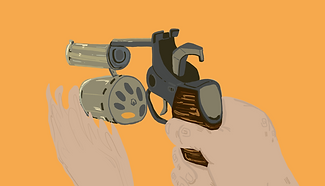
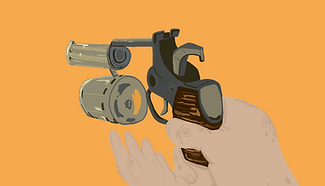


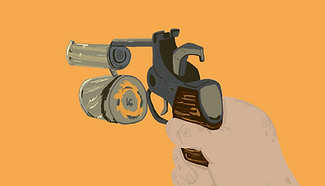


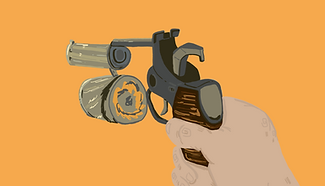


To make the scene actually effective after I had planned it all out. I learnt this over the summer holidays. I really dont understand the brushes on tv paint but I have more experience in photoshop, I mean tv paint is amazing for sketching and planning but when it comes to colour I just... get confused, nothing ever looks right.
SO I exported my entire scene as PNG images to then import them all into photoshop and colour them that way I used my concept art that I didn't like as an inspiration for the colours because sure even though the concepts I drew I didn't like ti didn't mean that the colour schemes i did i hated. I really want the scene where the bunny isn't going through to be on a bright yellow background because i think it is a loud contrasting colour that even though is usually related to happiness I think in the sense if a gun shoot it shows how powerful the shot is and I would make the background red but the text at the end is going to be red, so it would blend in.
Though even though I have had the test Idea planning, I have been thinking that when I get round to the end I could do sort of a bright explosion colours with orange and red instead of it being blood as I think that would be quite effective in terms of a motion graphic because I look back into my references and saul bass the main thing about effective motion graphics is the negative space being used appropriately as well as letting it frame the motion graphic so it is simple but effective, memorable not because of the detail but the message or the promotional context that it is giving. So what I am trying to say is the ending may be a little bit different to what is was in my concepting and animatic because I want my motion graphics to be as effective as possible.
・・・・・༉‧₊˚.


✦•┈๑⋅⋯ ⋯⋅๑┈•✦
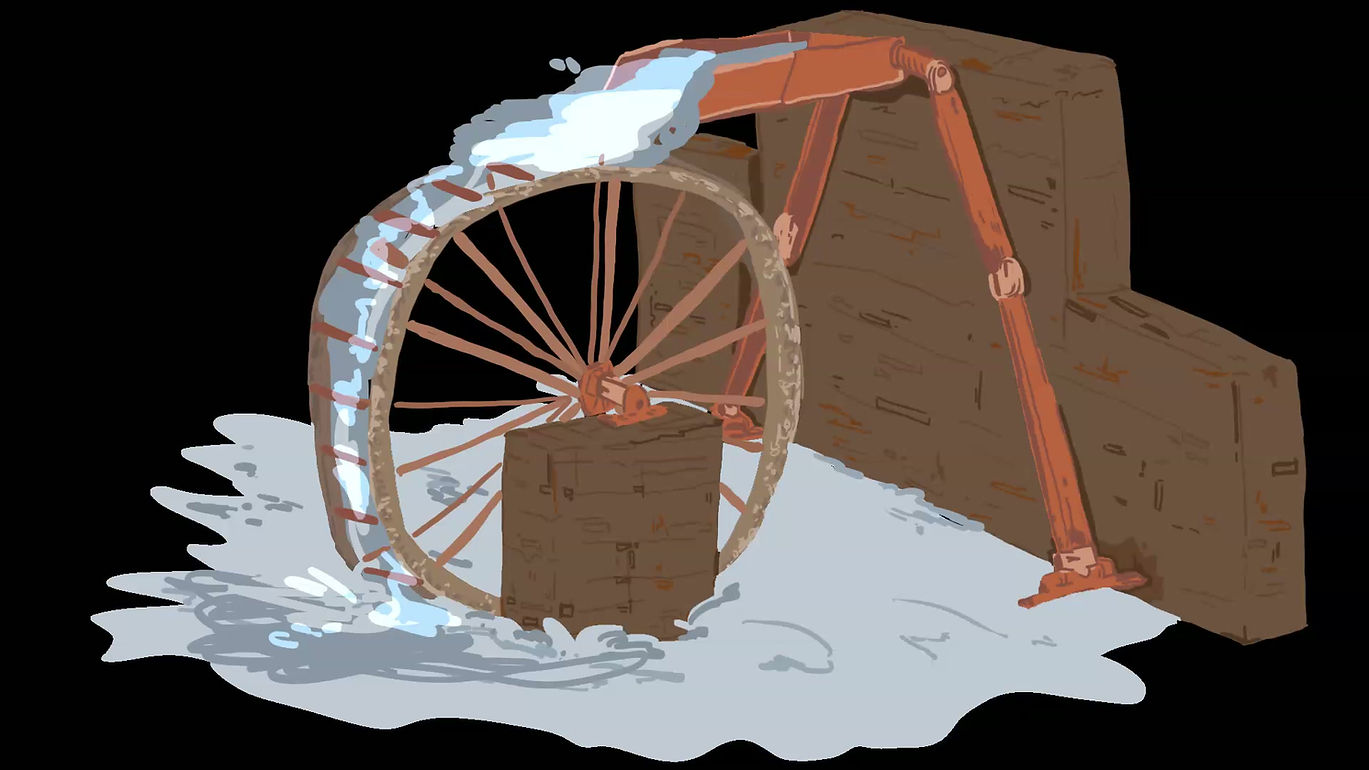
The next part of the motion graphic I made was my water mill spinning, I never made something like this before as well I haven't even seen a water mill in person i just know they exist, so I am not entirely sure how they move, everytime i tried to look for a reference image or video the videos would only talk about the history of a water mill, it was seriously the hardest thing to try and find a reference from, the best shot i had was this really old blender video someone had made on youtube that was incredibly low quality just so i knew which angle to put my water mill in to be honest nothing else really.
I tried it out multiple times until I had a version that I liked, due to my lack of knowledge in this I just tried to use the same knowledge I had for the gun spinning to repeat that for this. I found it was a lot harder than i thought it was gonna be. I understood how to do the middle section that was just poles moving around in a circle . It was really the slats that the water falls down onto and gets rotated around with. Now I am not sure AT ALL why these videos of my tests al exported with a background i have tried to export them again to fix it but it just, is stuck like this for some reason iso I do apologise if it is difficult to understand what I actually changed or drew due to the dark background.


To do colour in the frames for this animation I did it in photoshop just like i did thew gun animation now i did important some of the frames next to the screen shot of my process because I thought it would be important to note that they transparent background because well this isn't a scene by itself its part of the main scene and I am trying to make sure that with the least transitions it looks effective enough so it isn't confusing when it does cut and it is as smooth as i can get it to be as motion graphics are much different to an animation, there isn't many camera changes are different shots/scenes because that not what they are used for and if there are lots of scene changes it's usually done through an object or seamlessly so I am trying to achieve that with mine as well minimasing the camera movements is the way i figured it out because well I didn' t do all of that planning for nothing where i realised the camera moving back and forth meant it was too confusing for an informative motion graphic.. The png that is important you cant really see a difference in what i changed to be honest but all that i did move was the center of the water mill with all of the poles supporting it and the water falling into the pool underneath it. I did use a reference image but not for the drawing just for the colours because I wanted to find an image with a similar colour palette too. the one i used for the gun scene so it was clear and all liked pretty well visually.
the process of making this on photoshop was really difficult I think I should of probably stuck ot doing it on tv paint but I really wanted to try this out keep the pieces I was using for the whole thing throw out the whole thing, what i have learnt is i think the photoshop method all though it helps me with colouring it gets confusing to animate more than a few things that more moving differently to each other or are more intricate, I mean the gun i did had similar process but i think it is because i felt more confident with animating that the ni did this water mill, so it felt all foreign and wrong but I still gave it a go and still tried hard to complete it. I am proud of what I have accomplished to create as it took me a longer time than it should have due to certain mental health issues I have been having recently so that also may be why I struggled doing it on photoshop like I had been practicing over all of the summer holidays. But none the less first asset is complete time to move onto the other assess the last animated one before everything is just a bunch of pngs that I am going to piece together in after effects.


For the final animated part of the motion graphic I had to animate a bunny running so then instead of it just sort of hovering down the entire motion graphic it actually had movement to it so it feels sort of like a real bunny. The running cycle I did was actually the first running cycle i have ever done for anything especially an animal but for the projects i am doing this year i am really pushing my limits to make this I am not comfortable with. This motion graphic even though I didn't choose to do it selectively has been pushing me to my limits as well as I now have to include a moving animal. I thought this animation would be really confusing but using a video of a bunny running on tiktok and using the animator's survival kit book to help alongside the video I was watching.
I am not sure why I thought it would be hard i mean i have done a walking animation and it is pretty much the same concept, to be honest a running animation was much simpler as it needs less frames to give it the sense of speed, as well as i understood sort of now that there needs to be contact areas and poses for the character/animal that is moving and it needs to be able to loop and come back around. Using knowledge for last year and everything i had been looking at online in my book and just guessing I did everything on different layers to make sure i got the timing right and then just like i have everything else i did the i put it in photoshop, and i know that with the water mill I complained that multiple moving this was really difficult o gt down right in photoshop, but I seriously think the struggle as because i couldn’t find a good reference nor could i understand what to make move as this animation had multiple moving parts also ears that moved seperatly from the rest of the body and I found this really fun an enjoyable the colouring was simple as i like the brushes on photoshop and then to put the video back together it goes straight back into photoshop and the final looping clip i made to be 12 seconds long to follow along with my animatic plans that i had made, and this animation, I am really really proud of it, the movement i think is some of the best movement that i have done with animating a this point in my artisitc journey and I loved drawing the rabbit, to be honest i found animating the animal much simper than a humaniod that i did last year there just less to move and they are more rouded and can stretch much more than a humanoid creature. I really want to try and animate or inclued more animals in my work because this proved to be so fun and has taught me a lot just about simple movement.

⠀⠀⠀⠀⠀⠀⠀⠀⠀⠀⠀⠀⠀⠀⠀⠀⠀⠀⠀⠀⠀⠀⠀⠀⠀⠀⠀⠀⠀⠀⠀⠀⠀⢀⣀⠀⠀⠀⠀⠀
⠀⠀⠀⠀⠀⠀⠀⠀⠀⠀⠀⠀⠀⠀⠀⠀⠀⠀⠀⠀⠀⠀⠀⠀⠀⠀⠀⠀⠀⠀⠀⣀⡤⠤⠬⡉⠢⠀⠀⠀
⠀⠀⠀⠀⠀⠀⠀⠀⠀⠀⠀⠀⠀⠀⠀⠀⠀⠀⠀⠀⠀⠀⠀⠀⠀⠀⠀⠀⠀⠀⠘⠁⠀⠶⠦⢌⠢⠱⠀⠀
⠀⠀⠀⠀⠀⠀⠀⠀⠀⠀⠀⠀⠀⠀⠀⠀⠀⠀⠀⠀⠀⠀⠀⠀⠀⠀⠀⠀⠀⠀⠀⠀⠀⠀⠀⠀⢢⠁⡆⠀
⠀⠀⠀⠀⠀⠀⠀⠀⠀⠀⠀⠀⠀⠀⠀⠀⠀⠀⠀⠀⠀⠀⠀⠀⠀⠀⠀⠀⠀⠀⠀⠀⠀⠀⡔⣭⡙⣜⣁⡀
⠀⠀⠀⠀⠀⠀⠀⠀⠀⠀⠀⠀⠀⠀⠀⠀⠀⠀⠀⠀⠀⠀⠀⠀⠀⠀⠀⠀⠀⠀⠀⠀⣀⣀⠉⣊⣡⠋⠀⠀
⠀⠀⠀⠀⠀⠀⠀⠀⠀⠀⠀⠀⠀⠀⠀⠀⠀⠀⠀⠀⠀⠀⠀⠀⠀⠀⠀⠀⠀⠈⠦⢠⣿⣿⠹⠛⣿⠇⠀⠀
⠀⠀⠀⠀⠀⠀⠀⠀⠀⠀⠀⠀⠀⠀⠀⠀⠀⠀⠀⠀⠀⠀⠀⠀⠀⠀⠀⠀⠀⠀⢀⡬⠿⢮⡤⠞⣷⣦⠀⠀
⠀⠀⠀⠀⠀⠀⠀⠀⠀⠀⠀⠀⠀⠀⠀⠀⠀⠀⠀⠀⠀⠀⠀⠀⠀⠀⠀⠀⣰⣷⣿⣧⣴⡂⡶⣶⣾⡿⠂⠀
⠀⠀⠀⠀⠀⠀⠀⠀⠀⠀⠀⠀⠀⠀⠀⠀⠀⠀⠀⠀⠘⠳⠶⣤⡀⠀⠀⢸⣿⡏⠹⢿⣿⣵⡇⠀⠁⠀⠀⠀
⠀⠀⠀⠀⠀⠀⡀⠀⠀⠀⠀⠀⠀⠀⠀⠀⠀⠀⠀⠀⠀⠀⠀⣠⣬⣵⡦⡘⡇⠀⠀⢸⣣⢾⣿⡿⣶⣶⠀⠀
⠀⠀⠀⢀⣴⠟⠁⠀⠀⠀⠀⠀⠀⠀⠀⠀⠀⠀⠀⠀⠀⣴⣿⣿⣿⣿⠿⣏⢾⡄⠀⠏⠀⠈⠀⢐⣿⣿⠀⠀
⢀⣦⠀⡿⠁⢀⣤⠀⠀⠀⠀⠀⠀⠀⠀⠀⢀⡾⠷⡆⣤⣽⣿⣿⣿⣧⣤⠬⢌⣷⠀⣀⣒⣛⠛⠛⠋⠁⠀⠀
⠘⣇⠀⢧⠀⢸⠏⠀⠀⠀⠀⠀⠒⠲⠂⢀⡬⢧⡀⠛⢉⡼⠿⠿⣋⣡⠄⠀⠠⣦⠀⠈⣭⣿⣷⣄⠀⠀⠀⠀
⠀⠙⢆⠈⢆⠀⢣⡀⠀⡰⢪⡍⢦⠀⢠⣿⣿⣁⠿⡖⠚⢿⣶⣿⣿⣁⠄⢠⣿⣧⣠⡀⣤⣿⣿⡿⠀⠀⠀⠀
⠀⠀⠈⠑⢄⡑⠄⣈⠢⣴⣘⠒⠃⠀⠈⢻⣟⡕⠀⡿⣴⣾⣿⣿⣿⣿⣤⣿⠈⣿⣿⣿⣿⣿⣿⡇⠀⠀⠀⠀
⠀⠀⠀⠀⠀⠈⠑⠊⠭⠵⠶⠾⠟⠛⠋⠉⠘⣿⣷⡇⠈⠁⠘⠟⠻⢿⡿⠋⠀⠈⠛⠛⠙⠛⠛⠁⠀⠀⠀⠀
☆⋆。𖦹°‧★

⠀
⠀⠀ ⠀⠀ ⠀⠀ ⠀⠀ ⠀⠀ ⠀⠀ ⠀⠀:¨ ·.· ¨:
⠀⠀ ⠀⠀ ⠀⠀ ⠀⠀ ⠀⠀ ⠀⠀ ⠀⠀ `· . ꔫ
⠀⠀⠀⠀⠀⠀⠀⠀⠀⠴⣠⡀⡀⠀
⠀⢀⡔⠲⢄⡠⠖⠢⡀⠀⠈⠠⣖⠄
⠀⠘⢇⠀⠀⠀⠀⡠⠃⠀⠀⠀⠀⠀
⠀⠀⠈⠙⢄⡠⢋⣁⡀⠀⣀⣀⠀⠀
⢘⡀⠀⠀⠀⠀⡏⠀⠈⠚⠁⠀⡏⠀
⠈⠚⡀⢄⡀⠀⠘⠦⣀⢀⣠⠔⠁⠀
⠀⠀⠀⠑⠊⠀⠀⠀⠀⠑⠁⠀⠀⠀
This is the final animation and as i have said i really like it I decided to go with a brown colour scheme so it stand out from the yellow background and because all of the animals I am including are going to be white or cream coloured so it just made for a better contrast to the rest of the graphic.


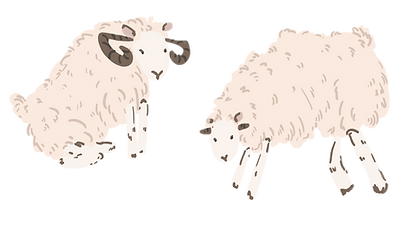


I then created all of the png assets that shall be smushed together in after effects to create the motion graphic. Without any of this the motion graphic really isn't anything just a moving gun. The colours i tried to keep pretty bright to compare to the background colour that i am using, I also drew the bunny for the last shot where well the bunny get shot in the head and I really like the brown I just I love my bunny design and I think it is really cool colour for a rabbit and I also REALLY love rabbits so that may be swaying me. To draw th animals i spent a long time making sure everything looked like an animal because for some reason I literally cannot see any animal in my head like at all so references from pinterest helped a load. the rest of the assets are just a bunch of leaves and bushes to build an environment in the yellow void that i will all be going in, I want the background colour to stay consistent not only because well i mean the concept art I did have a yellow background but also because I think it makes for a more effective motion graphic that the detail parts stands out from the incredibly simple backgrounds. Doing all of these drawings was a really nice change of pace from everything that I had been doing with the animating and other projects. It just felt fun and relaxed to draw parts that I will get to put together like a big puzzle next week and make it all move. I made sure all of the rowing I did was consistently the same style as I wanted it to give off an illustrative feeling to it to show the childness of Lennie's personality. I think I was able to convey it pretty well. These drawings took a long time because I was really focused on making sure they looked exactly how I was picturing them and I also just found this task to be really enjoyable.
Now I have all of the pieces I feel ready to go into next week with an editing mindset and start piecing everything together and actually have a video to show off and be able to add sound to!!!!!
Something I failed to mention was the text in my animatic stage I chose this creepy text that looked like blood when i actually get round to editing i will be using this website "Dafonts" to find an accurate text because i feel like the creepy bloody text no longer really fits the drawing style that i did because its oo creepy, to gorey I want everything to be consistent.
┊ ✩ ┊ ✧ ┊ ┊
┊ ┊★ ┊ ✩⋆
┊ ┊ ⊹˚
✩⋆ ✮